If you like downloading movies on your device to watch them later uninterrupted, then the LokTV app could be the best choice for you, as the app offers an easy way to download your favourite movies and series in the chosen resolution, and the platform provides different video quality choices to help manage storage space and data usage efficiently.
There is a vast range of entertainment content, so you can explore the library and find the beloved content that you can download later with subtitles. It comes with a smart download management system that lets users neatly organise the downloaded video list in a certain order. Unlike Netflix, it does not automatically delete videos, so the downloaded file will remain saved until you delete it manually.
In this guide, you will learn the proper steps to download movies from the LokTV app on your compatible device and access it to watch movies and shows offline and enjoy smooth playback without interruption caused by slow internet or an unstable server.

Requirements Before Downloading Movies From LokTV
To be eligible to download movies from the LokTV app, there are a few things you must have and meet the given requirements.
1. Sufficient Storage
Sufficient storage on your device is required for the LokTV app movie downloads. Movie file sizes typically vary from 1.5 GB to 2 GB. Always ensure at least 2-5 GB of free space for a smooth downloading experience.
2. Fast Internet
To download movies, an internet connection is a must. A good, fast connection is essential. Always ensure your device is connected to a stable network before downloading any videos to avoid getting the download stuck in the middle.
3. Compatible Device
Only download movies on compatible devices. LokTV is compatible solely with smartphones, not PCs or TVs. Remember to use compatible devices for all movie downloads.
4. Grant Storage Permission
When you attempt to download a movie or series from the LokTV app, it may ask for storage permission, which is required, so make sure you allow the permission or else the offline viewing feature simply won’t function on your device.
Easy Steps to Download Full Movies From LokTV
This is the detailed instruction to download full movies from LokTV app to watch offline for free of cost.
- Follow this link to download the latest LokTV app on your device.
- Open the Settings and toggle on the Install Unknown Apps.
- Go to Files then Download folder and locate the LokTV APK file.
- Tap on it and press on the Install button that pops up on the screen to install this app.
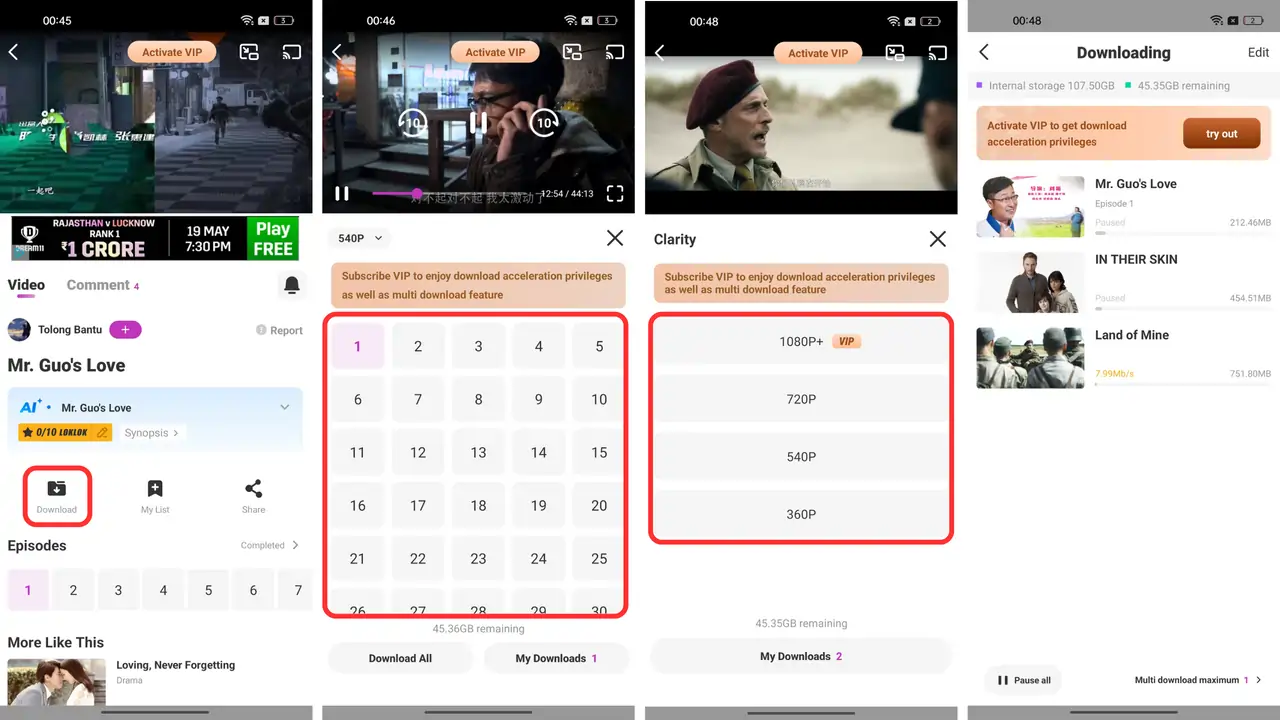
- Launch LokTV app and search for your favorite movie or series that you want to download.
- Tap on it and then click on the Download button shows on the screen.
- It will ask users to select episodes (If it is a TV series) and then you will get to choose video quality from 480p to 1080p.
- Finally, click on the Download button to start downloading the video.
- Go to the Download section to check the progress, you can pause and resume the download based on your need.
Give it some time till it finishes downloading process. Once the download is complete, you can enjoy your favourite movies and TV series anytime anywhere even without an internet connection.
How to Locate and Play LokTV Downloaded Videos?
The downloaded video can be found within the download section of the LokTV app. You can also use the default gallery app or File Manager to locate the downloaded movie.
- Go to the Gallery of Files App
- Locate the Download folder
- Scroll down till your find the downloaded movie
- Tap on it and choose the preferred media player, such as the default player, or you can use MX Player (If installed).
- Now, the video streaming will start on your screen and you can enjoy watching the movie.
Common Download Issues and How to Fix Them
Several problems users normally face while downloading a movie from LokTV app but they are tretable if you play smart and if you’re aware of the solutions given below, you will surely be able to get away from all the issues.
1. Download Stuck in Middle:
Downloading videos may get stuck in the middle of the process due to a sudden loss or a slow internet connection. Do make sure to always have a good and stable internet connection before downloading movies. When the video downloading is not progressing at all, then you have only one option, and that is to delete the old download and start a fresh one. But before you do that, turn on airplane mode for 5-10 seconds, then disable it.
2. Broken Links:
LokTV relys on third party stremable links as all the videos available in this platform are not solely hosted on its own server, they are aggregated from various sources on the internet and some of these links might get taken down due to copyright infringements. However, you can repotrt such problem directly from the app to get teh issue resolved within few hours.
3. Insufficient Storage Space:
Movies in HD quality is a large file and many people start downloading videos without checking if they have adequate free storage space on their device. If your device’s storage is not enough, the downloading may failed, stuck or video may get corrupted due to insufficient storage space. Therefore, remember to free up some space on your device before downloading a HD movie.
4. Disable Ad-Blocker:
An active Ad Blocker might create difficulties when you try to download movies from the LokTV app. Ad blockers typically prevent the opening of third-party links, which can then stop you from successfully downloading videos. Therefore, to ensure a smooth process, it is highly recommended that you do not use any Ad Blocker tool or software on your device while utilizing the LokTV app.
5. Avoid Using VPN:
Well using VPN is not a problem but sometimes VPN actually slow down the downloading speed on LokTV app so to ensure a faster and stable download, keep VPN or Proxy disabled.
Conclusion
Now, you know pretty well how to download movies from LokTV app and infact if you’ve gone through the whole infomation mentioend above, you know how to pull out all the stops and tackle common troubleshooting. LokTV is loaded with thousands of intresting movies and shows that you can download for free in desired resolaution without spending a dime, so save your favorite picks and keep them stored on your device as long as you wish to have it.